Cuisinart Coffee Maker Clean Light: What to Do
When your Cuisinart coffee maker clean light turns on, descale the machine using its model-specific cleaning procedure, then complete the fresh-water rinses. If the light stays on, check the required cycle and reset steps before adding more cleaner.
On this page (7 sections)
- What does the Cuisinart coffee maker clean light mean?
- How do you clean a Cuisinart coffee maker when the light comes on?
- What should you do if the clean light stays on?
- Should you replace the water filter when descaling?
- What mistakes make coffee maker cleaning less effective?
- How can you prevent mineral buildup from returning?
- Which product should you choose for a Cuisinart coffee maker clean light?
When your Cuisinart coffee maker clean light turns on, descale the brewer and complete its fresh-water rinses using the procedure for your exact model. A light that stays on calls for checking the cleaning cycle and reset instructions before adding more cleaner.
You usually need a maintenance routine, not a new coffee maker. Choose a suitable cleaner, keep filter replacement separate from descaling, and check the completed process before treating the machine again.
What does the Cuisinart coffee maker clean light mean?
The clean light signals that decalcifying is due on models with that indicator. Minerals from water can collect inside the brewing system, where buildup may restrict flow and affect heating.
Descaling targets those deposits. Washing the carafe removes coffee residue, but it doesn't replace cleaning the internal water path.
A reminder light also doesn't identify every brewing problem. Slow flow, weak coffee, or water around the machine may need separate checks if they continue after proper maintenance.
For the difference between daily washing and internal cleaning, see our guide to how to clean a drip coffee maker.
How do you clean a Cuisinart coffee maker when the light comes on?
Use your model's cleaning procedure from start to finish, including its approved solution, cycle, and rinse requirements. Don't borrow a button sequence from a different Cuisinart brewer.
Before starting, find the model number and matching manual. Have the cleaner directions nearby so you can compare the dose, water amount, and rinse steps.
- Empty the brewer. Remove used grounds and the paper coffee filter, if fitted, and empty the carafe.
- Check removable parts. Follow the manual's instructions for the charcoal water filter and holder during descaling.
- Prepare the solution. Measure the cleaner and water as directed without exceeding the reservoir's fill limit.
- Run the specified cycle. Use the cleaning mode or brew process required for your model, with the carafe correctly seated.
- Discard and rinse. Empty the used solution and complete the required cycles with fresh water.
- Check the result. Confirm that the process finished and check the light before preparing coffee.
Start when you can finish the whole process, including rinsing. Don't leave cleaning solution in the reservoir overnight unless the instructions specifically call for that contact time.
Which cleaner suits a Cuisinart coffee maker clean light?
Choose a coffee maker descaler that your machine's instructions permit, then decide whether you need cleaner alone or replacement filters too. A larger pack is useful only if you'll use it regularly.
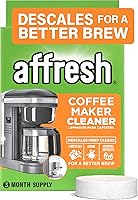
Affresh Coffee Maker Cleaner suits someone who wants a small supply of tablets without vinegar odor. It contains 3 tablets, works with multi-cup and single-serve brewers, and carries U.S.
EPA Safer Choice certification.
Choose Affresh if you want to establish a routine without storing a large pack. Skip it if you also need charcoal filters, since it addresses cleaning rather than filter replacement.
GoldTone Cuisinart Water Filters suits someone whose filter replacement and descaling are both due. The set combines 12 charcoal filters with a descaler for calcium deposits and other mineral buildup.
Choose GoldTone when you need both supplies and have confirmed the filter fit. Skip the bundle if you already have spare filters or your brewer doesn't use that style of cartridge.
Charcoal filters address water impurities, odors, and flavors; descaler addresses deposits already inside the machine. Buying them together doesn't make either task a substitute for the other.
What should you do if the clean light stays on?
Check whether the required cleaning cycle and rinses finished before repeating treatment. A light that remains on doesn't, by itself, tell you to use a stronger solution.
Work through these checks in order:
- Confirm that you used the cleaning mode if your model requires one.
- Check whether the cycle stopped early or lost power.
- Count the completed fresh-water rinses against the manual's requirements.
- Follow any reset steps written for your exact model.
- Check whether another treatment is allowed before repeating descaling.
Clean Elements notes that some machines need a reset or additional rinsing, while heavy buildup may require further treatment. Those possibilities aren't a universal reset procedure for Cuisinart brewers.
If the correct procedure still leaves the light on, contact Cuisinart support with the model number and the steps you completed. That gives support more useful information than a list of button combinations you've tried.
Does the Cuisinart DCC-3200 clean light mean you need a replacement?
The DCC-3200's decalcify indicator is a maintenance prompt, so address cleaning before shopping for another brewer. Use its manual for the cleaning sequence and any steps needed afterward.
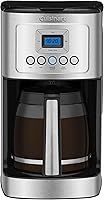
The Cuisinart DCC-3200 suits households that brew shared pots and want scheduled morning coffee. It has a 14-cup glass carafe, with each cup about 5 ounces, plus 24-hour programming.
Its regular and bold settings let you choose brew strength, while adjustable warming-plate temperature suits people who keep a pot available. The 1–4 cup setting also gives occasional smaller batches a dedicated option.
Skip it if your main need is a single mug or a thermal carafe. Its maintenance light is useful, but it doesn't remove the need to descale or justify replacing an otherwise working machine.
Read our Cuisinart DCC-3200 review for a closer look. If replacement becomes necessary, compare brewing formats in our home coffee maker guide.
Should you replace the water filter when descaling?
Replace the charcoal filter when its own schedule calls for it, rather than automatically discarding it whenever the clean light appears. Descaling and filter replacement follow separate instructions.
GoldTone recommends replacing its filters every 60 days or 60 tank refills. Track both if you brew often, and check your machine's requirements before choosing a replacement date.
During installation, follow the filter directions for any soaking or rinsing and seat the cartridge correctly in its holder. Don't assume a new cartridge is ready to install straight from the package.
Record the filter change separately from the descaling date. A fresh filter won't remove scale already attached to internal parts or clear the reminder by itself.
What mistakes make coffee maker cleaning less effective?
Wrong dosing, incomplete rinsing, and confusing surface stains with scale can lead to unnecessary repeat treatments. Correct the process before increasing the amount of cleaner.
Don't mix vinegar with a commercial descaler or combine different cleaners. Use one permitted method at the stated strength, and never add coffee grounds during a cleaning cycle.
Don't stop after the cleaning solution has passed through. Fresh-water rinses are part of the procedure, and a quick rinse of the carafe doesn't flush the brewer's internal water path.
A stained plastic reservoir also doesn't prove descaling failed. Clean Elements specifically notes that its tablets remove mineral buildup rather than bleach plastic surfaces.
Finally, avoid treating every problem as scale. If the brewer also drips onto the counter, use our guide to why a Cuisinart coffee maker leaks to check that issue separately.
How can you prevent mineral buildup from returning?
Keep a dated descaling routine and respond to the machine's reminder. Water hardness and how often you brew affect how quickly deposits return.
Affresh recommends monthly use or as needed, while GoldTone suggests descaling every 2–3 months. Follow the schedule compatible with your Cuisinart manual rather than choosing whichever interval is longest.
Clean Elements recommends 1 tablet every 30 days or about 30 brew cycles. That makes recording brew frequency useful if your household makes several pots a day.
Wash the carafe, basket, and other removable parts as directed between descaling sessions. Our guide to how to clean a drip coffee maker covers the wider care routine.
If the reminder returns unusually soon, check your last cleaning record and confirm the full process was completed. Repeated reminders after correct cleaning are a reason to seek model-specific help, rather than keep adding cleaner.
Which product should you choose for a Cuisinart coffee maker clean light?
For a Cuisinart coffee maker clean light, buy a permitted descaler first and add filters only when they're due. Choose a replacement brewer only after maintenance and further checks show that you need one.
Clean Elements Descaler Tablets suit someone who wants a larger supply for recurring care. The pack contains 24 tablets and includes Cuisinart among its compatible coffee machine brands.
Clean Elements directs you to use 1 tablet in the reservoir with clean water, followed by 1–2 fresh-water cycles, while following the machine's procedure. Skip the larger pack if you rarely need cleaner or prefer a smaller supply.
Choose Affresh for a small tablet pack, GoldTone when you also need charcoal filters, or Clean Elements for regular descaling from a larger pack. Keep the DCC-3200 on your shortlist only if you're replacing a brewer and want programmable pot brewing.
Once the light clears, record the cleaning date and the next filter change. For the daily tasks that support that routine, follow our guide to cleaning a drip coffee maker.
Frequently asked questions
Why is my Cuisinart coffee maker clean light on?
The clean light signals that decalcifying is due on models with that indicator, including the DCC-3200. It is a maintenance reminder, not proof that the brewer needs replacing.
Use your model's cleaning procedure to remove mineral buildup, then complete the required fresh-water rinses.
How do I turn off the clean light on a Cuisinart coffee maker?
Complete the descaling and rinsing procedure for your exact model, then check its reset instructions if the light remains on. There is no button sequence to assume across all Cuisinart machines.
Confirm that the required cleaning cycle finished before repeating a treatment or adding more descaler.
Can I use vinegar to clean a Cuisinart coffee maker?
Use vinegar only if your Cuisinart manual permits it, at the dilution and rinse schedule it specifies. Don't mix vinegar with a commercial cleaner or substitute a stronger solution.
If you prefer a coffee maker descaler, check that your machine's instructions permit that option before starting.
How often should I descale a Cuisinart coffee maker?
Use your Cuisinart manual and cleaning reminder to set the schedule, since water hardness and brewing frequency affect mineral buildup. Cleaner brands give different maintenance intervals, so don't choose by package size alone.
Record each cleaning date and watch for changes in water flow between scheduled cleanings.